
Building a Cisco VXLAN EVPN Fabric with NX-OSv – Part 1: Underlay Network & Interface Configuration (OSPF)
 Suresh Thapa
Introduction
In modern data center networks, scalability and flexibility are critical. Traditional Layer 2 designs struggle with limitations like spanning tree and VLAN constraints. This is where VXLAN (Virtual Extensible LAN) combined with EVPN (Ethernet VPN) comes in.
In this blog, we’ll walk through a Cisco NX-OSv VXLAN EVPN fabric, focusing specifically on the Underlay configuration:
- Underlay routing core (OSPF)
- EVPN control plane (BGP Route Reflector)
- Multicast RP (Anycast RP for VXLAN BUM traffic)
Topology Overview
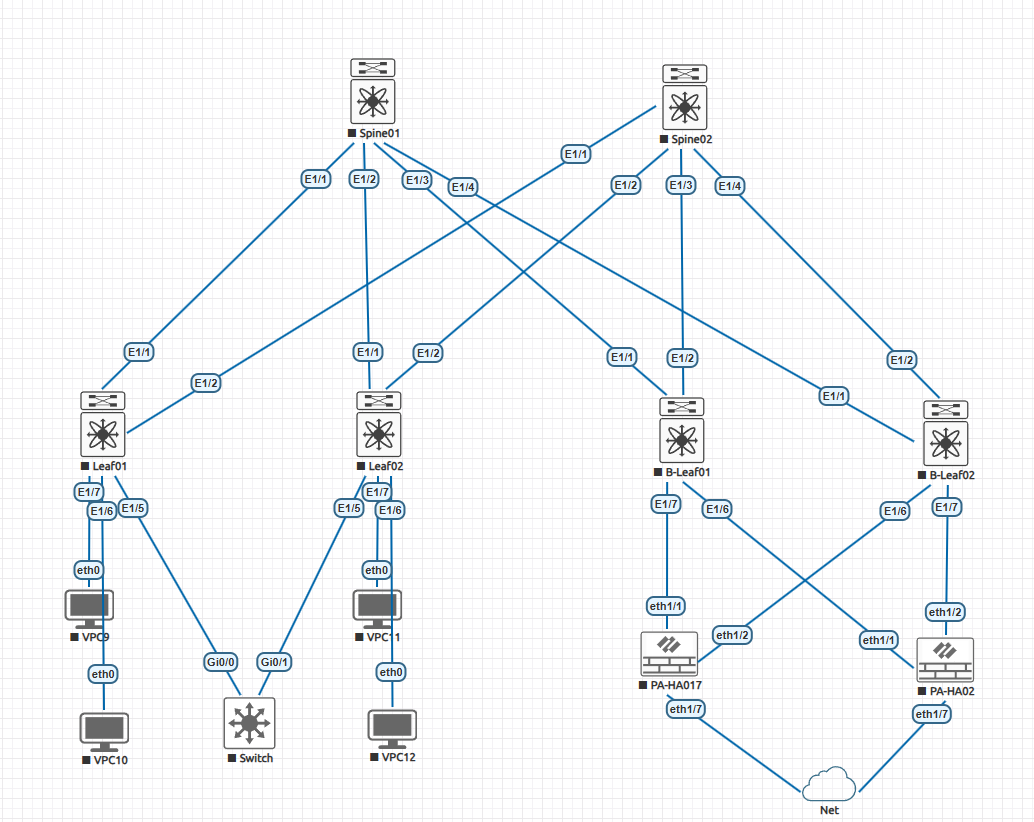
- Spine01 and Spine02 connects to multiple leaf switches via Layer 3 links.
- Each link uses a /31 subnet for efficient IP usage.
- Loopback interfaces are used for:
- Router ID
- BGP peering
- VXLAN tunnel endpoints (in leafs)
1. Network Interfaces Configuration
The underlay provides IP reachability between all VTEPs.
Interfaces Configuration
Each interface toward leafs is configured as Layer 3:
Key Points:
no switchport→ Enables Layer 3 mode- /31 addressing → Efficient point-to-point links
- MTU 9216 → Required for VXLAN encapsulation
- Repeat for all spine-to-leaf links
Spine01
hostname Spine01
interface ethernet 1/1
 no switchport
 ip address 10.1.1.0/31
 mtu 9216
 no shutdown

interface ethernet 1/2
 no switchport
 ip address 10.1.1.2/31
 mtu 9216
 no shutdown

interface ethernet 1/3
 no switchport
 ip address 10.1.1.4/31
 mtu 9216
 no shutdown

interface ethernet 1/4
 no switchport
 ip address 10.1.1.6/31
 mtu 9216
 no shutdown
Loopback Interface
interface loopback 0
 ip address 1.1.1.1/32
 no shutdown
Used for:
- Router ID
- BGP peering source
Spine02
hostname Spine02
interface ethernet 1/1
 no switchport
 ip address 10.1.2.0/31
 mtu 9216
 no shutdown

interface ethernet 1/2
 no switchport
 ip address 10.1.2.2/31
 mtu 9216
 no shutdown

interface ethernet 1/3
 no switchport
 ip address 10.1.2.4/31
 mtu 9216
 no shutdown

interface ethernet 1/4
 no switchport
 ip address 10.1.2.6/31
 mtu 9216
 no shutdown
Loopback Interface
interface loopback 0
 ip address 2.2.2.2/32
 no shutdown
Used for:
- Router ID
- BGP peering source
Leaf01
hostname Leaf01
interface ethernet 1/1
 no switchport
 ip address 10.1.1.1/31
 mtu 9216
 no shutdown

interface ethernet 1/2
 no switchport
 ip address 10.1.2.1/31
 mtu 9216
 no shutdown
Loopback Interface
interface loopback 0
 ip address 11.11.11.11/32
 no shutdown
Used for:
- Router ID
- BGP peering source
Leaf02
hostname Leaf02
interface ethernet 1/1
 no switchport
 ip address 10.1.1.3/31
 mtu 9216
 no shutdown

interface ethernet 1/2
 no switchport
 ip address 10.1.2.3/31
 mtu 9216
 no shutdown
Loopback Interface
interface loopback 0
 ip address 22.22.22.22/32
 no shutdown
Used for:
- Router ID
- BGP peering source
B-Leaf01
hostname B-Leaf01
interface ethernet 1/1
 no switchport
 ip address 10.1.1.5/31
 mtu 9216
 no shutdown

interface ethernet 1/2
 no switchport
 ip address 10.1.2.5/31
 mtu 9216
 no shutdown
Loopback Interface
interface loopback 0
 ip address 33.33.33.33/32
 no shutdown
Used for:
- Router ID
- BGP peering source
B-Leaf02
hostname B-Leaf02
interface ethernet 1/1
 no switchport
 ip address 10.1.1.7/31
 mtu 9216
 no shutdown

interface ethernet 1/2
 no switchport
 ip address 10.1.2.7/31
 mtu 9216
 no shutdown
Loopback Interface
interface loopback 0
 ip address 44.44.44.44/32
 no shutdown
Used for:
- Router ID
- BGP peering source
2. Underlay Network Configuration (OSPF)
Spine01
feature ospf
router ospf 1
 router-id 1.1.1.1
Enable OSPF on all interfaces:
interface ethernet 1/1-4
 medium p2p
 ip router ospf 1 area 0

interface loopback 0
 ip router ospf 1 area 0
Why OSPF?
- Simple underlay routing
- Fast convergence
- Supports ECMP for load balancing
Spine02
feature ospf
router ospf 1
 router-id 2.2.2.2
Enable OSPF on all interfaces:
interface ethernet 1/1-4
 medium p2p
 ip router ospf 1 area 0

interface loopback 0
 ip router ospf 1 area 0
Leaf01
feature ospf
router ospf 1
 router-id 11.11.11.11
Leaf02
feature ospf
router ospf 1
 router-id 22.22.22.22
Enable OSPF on all interfaces:
interface ethernet 1/1-2
 medium p2p
 ip router ospf 1 area 0

interface loopback 0
 ip router ospf 1 area 0
B-Leaf01
feature ospf
router ospf 1
 router-id 33.33.33.33
Enable OSPF on all interfaces:
interface ethernet 1/1-2
 medium p2p
 ip router ospf 1 area 0

interface loopback 0
 ip router ospf 1 area 0
B-Leaf02
feature ospf
router ospf 1
 router-id 44.44.44.44
Enable OSPF on all interfaces:
interface ethernet 1/1-2
 medium p2p
 ip router ospf 1 area 0

interface loopback 0
 ip router ospf 1 area 0