
Building a Cisco VXLAN EVPN Fabric with NX-OSv – Part 3: VXLAN Data Plane (VTEP, VNI, and Anycast Gateway)
 Suresh Thapa
Introduction
In Part 2, we established the EVPN control plane using BGP and prepared multicast with PIM Anycast RP.
Now, in Part 3, we finally bring the VXLAN fabric to life by configuring the data plane on leaf switches.
This part covers:
- NVE (VXLAN Tunnel Interface)
- VLAN to VNI mapping
- EVPN instances (L2VNI & L3VNI)
- Anycast Gateway
- Host-facing interfaces
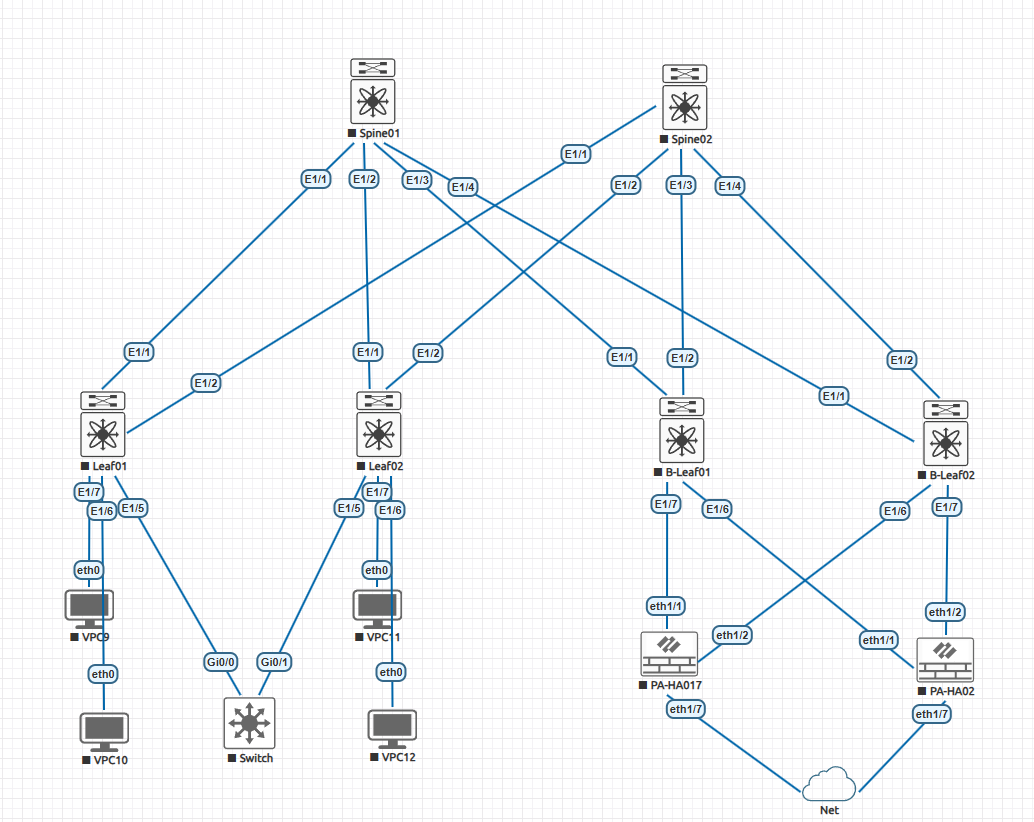
This is where encapsulation happens and endpoints can finally communicate across the fabric.
1. Enable VXLAN & NVE Interface (same for all leaf switches)
First, enable VXLAN and configure the NVE interface (VTEP):
feature nv overlay

interface nve1
  no shutdown
  source-interface loopback0
  host-reachability protocol bgp
Key Concepts
- nve1 → VXLAN Tunnel Interface (VTEP)
- source-interface loopback0 → Stable VTEP IP
- host-reachability protocol bgp → Uses EVPN (BGP) for MAC/IP learning
2. Enable VLAN-Based Segmentation (same for all leaf switches)
feature vn-segment-vlan-basedThis allows mapping:
- VLAN ↔ VNI (VXLAN Network Identifier)
3. VLAN to VNI Mapping (Layer 2 VNIs) (same for all leaf switches)
vlan 10
  vn-segment 10010

vlan 20
  vn-segment 10020
Explanation
| VLAN | VNI | Purpose |
|---|---|---|
| 10 | 10010 | L2 segment |
| 20 | 10020 | L2 segment |
Each VLAN is extended across the fabric using a unique VNI.
4. EVPN Configuration (EVI) (same for all leaf switches)
Define EVPN instances for each VNI:
evpn
  vni 10010 l2
    rd auto
    route-target import auto
    route-target export auto

  vni 10020 l2
    rd auto
    route-target import auto
    route-target export auto
Key Points
- RD (Route Distinguisher) → Makes routes unique
- RT (Route Target) → Controls route import/export
- auto → Simplifies configuration
5. Attach VNIs to NVE Interface
interface nve1
  member vni 10010
    mcast-group 239.1.1.10

  member vni 10020
    mcast-group 239.1.1.20
Why Multicast Groups?
- Used for BUM traffic replication
- Each VNI gets its own multicast group
6. Configure Access Ports (Host Connectivity) (same for all leaf switches)
interface Ethernet1/6
  switchport mode access
  switchport access vlan 20
  no shutdown

interface Ethernet1/7
  switchport mode access
  switchport access vlan 10
  no shutdown
What This Does
- Connects end hosts to the VXLAN fabric
- Maps physical ports → VLAN → VNI
7. Layer 3 VXLAN (L3VNI – Inter-VLAN Routing) (same for all leaf switches)
Now we enable routing between VLANs using a VRF and L3VNI.
Create VRF
vrf context CUST1
  vni 50000
  rd auto
  address-family ipv4 unicast
    route-target both auto
Explanation
- VRF = Tenant network
- VNI 50000 = L3VNI (Transit VNI)
Transit VLAN for L3VNI
vlan 500
  vn-segment 50000
Attach L3VNI to NVE
interface nve1
  member vni 50000 associate-vrf
Important
associate-vrf→ Marks this VNI as Layer 3 VNI
8. Anycast Gateway Configuration (same for all leaf switches)
fabric forwarding anycast-gateway-mac 0000.beef.cafeWhy This Matters
- Same gateway MAC across all leafs
- Enables:
- Active-active gateway
- Optimal routing (no hairpinning)
9. Enable SVI Interfaces (Gateway for Hosts) (same for all leaf switches)
feature interface-vlan
VLAN 10 SVI
interface Vlan10
  vrf member CUST1
  ip address 192.168.10.1/24
  fabric forwarding mode anycast-gateway
  no shutdown
VLAN 20 SVI
interface Vlan20
  vrf member CUST1
  ip address 192.168.20.1/24
  fabric forwarding mode anycast-gateway
  no shutdown
Transit SVI (L3VNI)
interface Vlan500
  vrf member CUST1
  ip forward
  no shutdown
Key Points
ip forward→ Required for L3VNI data plane- No IP needed → used internally by VXLAN
10. End-to-End Flow (What Happens Now)
- Host sends traffic → Leaf switch
- Leaf maps:
- VLAN → VNI
- VXLAN encapsulation happens at NVE
- Traffic travels over IP underlay
- Remote leaf decapsulates and forwards
For inter-VLAN:
- Traffic uses L3VNI (50000) via VRF
11. Verification Commands
show nve peers
show nve vni
show bgp l2vpn evpn
show mac address-table
Expected Results
- NVE peers → Up
- VNIs → Active
- MAC/IP routes → Learned via EVPN
- Hosts → Reachable across leafs
12. Key Takeaways
| Component | Role |
| NVE | VXLAN tunnel endpoint |
| L2VNI | Extends VLANs |
| L3VNI | Enables routing |
| VRF | Tenant isolation |
| Anycast GW | Distributed gateway |
Conclusion
At this stage, your VXLAN fabric is fully functional:
- Underlay (OSPF)
- Control Plane (BGP EVPN)
- Data Plane (VXLAN + VNI + NVE)
You now have a fully operational VXLAN EVPN fabric with both Layer 2 and Layer 3 capabilities.
Tags:
BGP
Cisco
EVPN
VXLAN