
How to Configure Console, AUX, Telnet, Enable, and Enable Secret Passwords on a Cisco Router
 Suresh Thapa
When setting up a Cisco router, it's essential to configure various passwords to secure different modes and access points. Here are the five main types of passwords you can configure:
- Console Password
- AUX (Auxiliary) Password
- VTY (Telnet) Password
- Enable Password
- Enable Secret Password
1. Console Password
The console port is the most basic connection method for accessing a Cisco router. It is typically used during the initial setup.
Configuration:
R1(config)#line console 0
R1(config-line)#password cisco
R1(config-line)#login
2. AUX (Auxiliary) Password
The AUX port is used for remote access via a modem. On some routers, it’s labeled as the "aux" or "auxiliary" port.
Configuration:
R1(config)#line aux 0
R1(config-line)#password cisco
R1(config-line)#login
3. VTY (Telnet) Password
VTY lines are used for remote Telnet access. Configuring this is crucial if you want to manage the router over a network.
Configuration:
R1(config)#line vty 0 4
R1(config-line)#password cisco
R1(config-line)#login
4. Enable Password
The enable password is used to move from user EXEC mode to privileged EXEC mode. However, this password is stored in plain text and is considered insecure.
Configuration:
R1(config)#enable password cisco
5. Enable Secret Password
The enable secret password serves the same purpose as the enable password but is stored using strong encryption, making it more secure.
Configuration:
R1(config)#enable secret cisco123
Encrypting Your Passwords
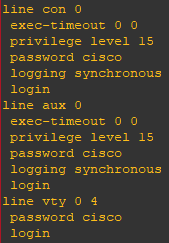
By default, line passwords (console, aux, and VTY) are not encrypted. They can be viewed in plain text using the following command in privileged EXEC mode:
Router#show running-config
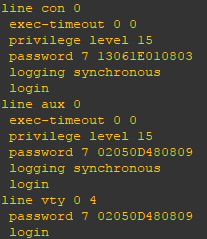
To encrypt these passwords, use the service password-encryption command:
Router(config)#service password-encryption
Conclusion
Securing your router with proper passwords is a critical step in network security. Be sure to use strong, unique passwords and enable encryption to protect your configuration from unauthorized access.