
How to Configure DHCP Server on Juniper Router and Switch
 Suresh Thapa
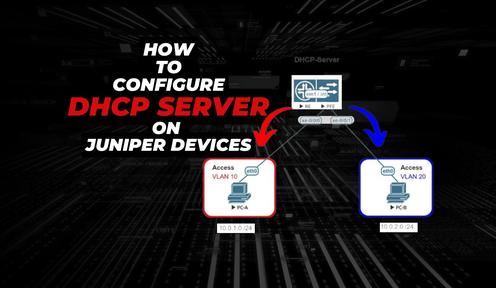
What is DHCP?
Dynamic Host Configuration Protocol (DHCP) is a network protocol that enables a server to automatically assign an IP address to a computer from a defined range of numbers (i.e., a scope) configured for a given network.
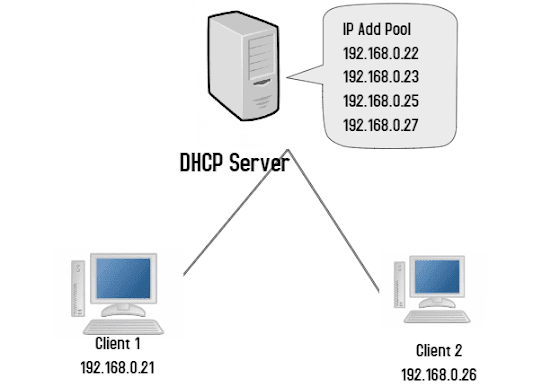
How DHCP assigns IP addresses
DHCP assigns an IP address when a system is started, for example:
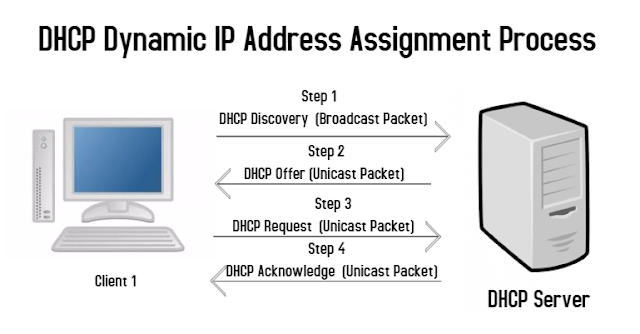
D – D in the term DORA stands for the DHCP Discover packet. The DHCP Discover packet
is broadcasted by the DHCP client computer in order to find the available DHCP server(s) in the network. Since the DHCP client computer sends the DHCP Discover packet as a broadcast, all the
DHCP servers that are present in the network receive the packet and respond accordingly.
O – O in the term DORA stands for the DHCP Offer packet. The DHCP Offer is a unicast packet that is sent by the DHCP server who receives the DHCP Discover packet from the DHCP client computer. The DHCP Offer packet contains the available IP address that the DHCP server offers to the client computer.
R – R in the term DORA stands for the DHCP Request packet. The DHCP Request is again a unicast packet sent by the DHCP client computer to the DHCP server who had sent the DHCP Offer packet to the client computer. With the help of the DHCP Request packet, the DHCP client computer requests the DHCP server to assign the offered IP address to it.
A – A in the term DORA stands for the DHCP Acknowledge packet. The DHCP Acknowledge is a unicast packet sent by the DHCP server to the DHCP client computer acknowledging the assignment of the offered IP address for a specific lease time.
Address lease times
Lease times for all Indiana University campuses are as follows:
Wired devices: 8 hours
Wireless devices: 20 minutes
Stand-alone VoIP phones: 1 week
To configure DHCP on Juniper Switch or Router. Follow these steps.
For this article I am using Juniper vQFX Switch vqfxre-10k-19.4R1.10.
Lets make DHCP pool for VLAN-10 and VLAN-20.
Create a DHCP Pool Name and network and subnet
root@DHCP-Switch# set access address-assignment pool VLAN-10 family inet network 10.1.10.0/24

root@DHCP-Switch# set access address-assignment pool VLAN-20 family inet network 10.1.20.0/24
Specify the default router
root@DHCP-Switch# set access address-assignment pool VLAN-10 family inet dhcp-attributes router 10.1.10.1

root@DHCP-Switch# set access address-assignment pool VLAN-20 family inet dhcp-attributes router 10.1.20.1
Specify the primary and secondary DNS servers
root@DHCP-Switch# set access address-assignment pool VLAN-10 family inet dhcp-attributes name-server 8.8.8.8
root@DHCP-Switch# set access address-assignment pool VLAN-10 family inet dhcp-attributes name-server 8.8.4.4

root@DHCP-Switch# set access address-assignment pool VLAN-20 family inet dhcp-attributes name-server 8.8.8.8
root@DHCP-Switch# set access address-assignment pool VLAN-20 family inet dhcp-attributes name-server 8.8.4.4
Specify the DNS domain name for the clients
root@DHCP-Switch# set access address-assignment pool VLAN-10 family inet dhcp-attributes domain-name themannschool.com

root@DHCP-Switch# set access address-assignment pool VLAN-20 family inet dhcp-attributes domain-name themannschool.com
Specify the lease time
root@DHCP-Switch# set access address-assignment pool VLAN-10 family inet dhcp-attributes maximum-lease-time 345600

root@DHCP-Switch# set access address-assignment pool VLAN-20 family inet dhcp-attributes maximum-lease-time 345600
Exclude any addresses in the pool range that you don’t want to hand out.
root@DHCP-Switch# set access address-assignment pool VLAN-10 family inet range RANGE-1 low 10.1.61.21
root@DHCP-Switch# set access address-assignment pool VLAN-10 family inet range RANGE-1 high 10.1.61.244

root@DHCP-Switch# set access address-assignment pool VLAN-20 family inet range RANGE-1 low 10.1.61.21
root@DHCP-Switch# set access address-assignment pool VLAN-20 family inet range RANGE-1 high 10.1.61.244
Configure the DHCP server group for the Layer 3 interface
root@DHCP-Switch# set system services dhcp-local-server group VLAN-10 interface irb.10

root@DHCP-Switch# set system services dhcp-local-server group VLAN-20 interface irb.20
Show command for check bind DHCP Addresses
root@DHCP-Switch> show dhcp server binding