
How to Configure EtherChannel on a Cisco Switch: Step-by-Step Guide
 Suresh Thapa
EtherChannel is a port link aggregation technology. It allows grouping of several physical Ethernet links to create one logical Ethernet link for the purpose of providing fault-tolerance and high-speed links between switches, routers and servers. Without EtherChannel, only one link will be available while the rest of the links will be disabled by STP, to prevent loop. An EtherChannel can be created from between two to eight Ports.
EtherChannel Negotiation
An EtherChannel can be established using one of three mechanisms:
PAgP - Cisco’s proprietary negotiation protocol. There are different modes.
Desirable: In this mode, the negotiation will be initiated by sending the special frames to form EtherChannel with the other end.
Auto: In this mode, negotiation is not initiated. It only responds to the special frames received for negotiation form the other end. So, if both ends are in Auto mode, EtherChannel would not be formed.
LACP - This is Standards-based (IEEE 802.3ad) negotiation protocol. Link Aggregation Control Protocol, is used to dynamically build an EtherChannel. There are different modes.
- Active: The active end of the group sends out a LACP frame and initiates the negotiation to form the EtherChannel. Both ends could be active and the result would be the same.
Passive: Passive Mode does not initiate the negotiation. It just responds to LACP packets initiated by other end. So if both ends were passive, the EtherChannel would not be formed.
Static Persistence (“On”) – No negotiation protocol is used
For this configuration, I am using EVE-NG with IOSv-L2
Perform these Task for configuring EtherChannel.
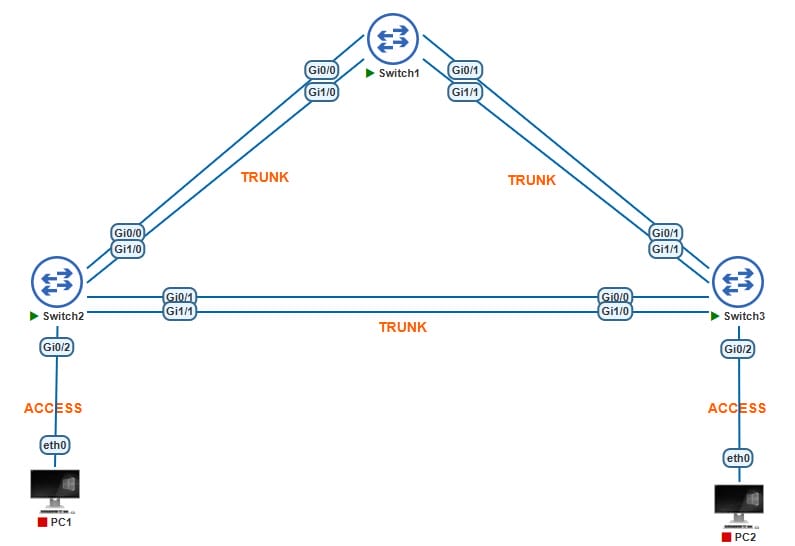
- Configure LACP between SW1 and SW2. SW1 should actively try to initiate an EtherChannel and SW2 should only respond to requests.
- Configure PAGP between SW1 and SW3. SW1 should actively try to initiate an EtherChannel and SW3 should only respond to requests.
- Configure an EtherChannel between SW2 and SW3 without any negotiation protocols.
- Configure the EtherChannel between SW1 and SW2 to use destination MAC address load-balancing.
Topology
Configurations of LACP Between Switch 1 and Switch 2
SW1(config)#interface range Gi0/0, Gi1/0
SW1(config-if-range)#channel-group 1 mode active
SW2(config)#interface range Gi0/0, Gi1/0
SW2(config-if-range)#channel-group 1 mode passive
Configure Port-Channel Interface Trunk as we mentioned above channel-group 1 on both switches.
SW1(config)#interface Port-channel 1
SW1(config-if)#switchport trunk encapsulation dot1q
SW1(config-if)#switchport mode trunk

SW2(config)#interface Port-channel 1
SW2(config-if)#switchport trunk encapsulation dot1q
SW2(config-if)#switchport mode trunk
Configurations of PAgP Between Switch 1 and Switch 3
SW1(config)#interface range  Gi0/1, Gi1/1
SW1(config-if-range)#channel-group 2 mode desirable
SW3(config)#interface range  Gi0/1, Gi1/1
SW3(config-if-range)#channel-group 2 mode auto
Configure Port-Channel Interface Trunk as we mentioned above channel-group 2 on both switches.
SW1(config)#interface Port-channel 2
SW1(config-if)#switchport trunk encapsulation dot1q
SW1(config-if)#switchport mode trunk

SW3(config)#interface Port-channel 2
SW3(config-if)#switchport trunk encapsulation dot1q
SW3(config-if)#switchport mode trunk
Configurations of Static (On) EtherChannel Between Switch 2 and Switch 3
SW2(config)#interface range Gi0/1, Gi1/1
SW2(config-if-range)#channel-group 3 mode on
SW3(config)#interface range Gi0/0, Gi1/0
SW3(config-if-range)#channel-group 3 mode on
Configure Port-Channel Interface Trunk as we mentioned above channel-group 3 on both switches.
SW1(config)#interface Port-channel 3
SW1(config-if)#switchport trunk encapsulation dot1q
SW1(config-if)#switchport mode trunk

SW3(config)#interface Port-channel 3
SW3(config-if)#switchport trunk encapsulation dot1q
SW3(config-if)#switchport mode trunk
Verify using show command on all the switches
SW2#show etherchannel summary
SW1

SW2

SW3
Verify interface status using below command as well.
show ip interface brief
Output should look like this
