How to Configure Static and Default Route on Cisco Router
 Suresh Thapa
What is Static Routing?
Static routing is a form of routing that occurs when a router uses a manually-configured routing entry, rather than information from a dynamic routing traffic. In many cases, static routes are manually configured by a network administrator by adding in entries into a routing table, though this may not always be the case. Unlike dynamic routing, static routes are fixed and do not change if the network is changed or reconfigured. Static routing and dynamic routing are not mutually exclusive. Both dynamic routing and static routing are usually used on a router to maximise routing efficiency and to provide backups in the event that dynamic routing information fails to be exchanged. Static routing can also be used in stub networks, or to provide a gateway of last resort.
What is Default Routing?
The default route generally points to another router, which treats the packet the same way: if a route matches, the packet is forwarded accordingly, otherwise the packet is forwarded to the default route of that router. The route evaluation process in each router uses the longest prefix match method to obtain the most specific route. The network with the longest subnet mask that matches the destination IP address is the next-hop network gateway.
Task for Configure Static Routing
- Configure Loopback Address on all routers
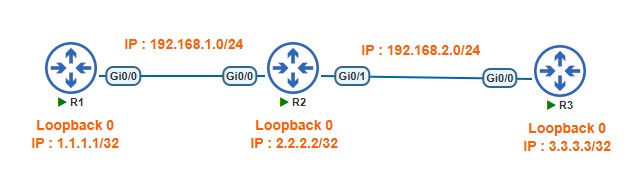
R1 Loopback 0 IP 1.1.1.1/32
R2 Loopback 0 IP 2.2.2.2/32
R3 Loopback 0 IP 3.3.3.3/32 - Configure Router interfaces IP addresses
Between R1 and R2 network 192.168.1.0/24
Between R2 and R3 network 192.168.2.0/24 - Create static route on R1 point to R2 loopback0 and R3 Loopback 0 and network 192.168.2.0/24, Traffic should pass 192.168.1.2
- Create static route on R2 pointing to R1 Loopback0 and R2 Loopback0
- Create Default route on R3
TOPOLOGY
Interface Configuration
Router-1
R1(config)#interface GigabitEthernet 0/0
R1(config-if)#ip address 192.168.1.1 255.255.255.0
R1(config-if)#no shutdown
R1(config-if)#exit
R1(config)#interface loopback0
R1(config-if)#ip address 1.1.1.1 255.255.255.255
R1(config-if)#exit
Router-2
R2(config)#interface GigabitEthernet 0/0
R2(config-if)#ip address 192.168.1.2 255.255.255.0
R2(config-if)#no shutdown
R2(config-if)#exit
R2(config)#interface loopback0
R2(config-if)#ip address 2.2.2.2 255.255.255.255
R2(config-if)#exit
R2(config)#interface GigabitEthernet 0/1
R2(config-if)#ip address 192.168.2.2 255.255.255.0
R2(config-if)#no shutdown
R2(config-if)#exit
Router-3
R3(config)#interface GigabitEthernet 0/0
R3(config-if)#ip address 192.168.2.3 255.255.255.0
R3(config-if)#no shutdown
R3(config-if)#exit
R3(config)#interface loopback0
R3(config-if)#ip address 3.3.3.3 255.255.255.255
R3(config-if)#exit
Static Routing Configuration
Router-1
R1(config)#ip route 2.2.2.2 255.255.255.255 192.168.1.2
R1(config)#ip route 192.168.2.0 255.255.255.0 192.168.1.2
R1(config)#ip route 3.3.3.3 255.255.255.255 192.168.1.2
Router-2
R2(config)#ip route 1.1.1.1 255.255.255.255 192.168.1.1
R2(config)#ip route 3.3.3.3 255.255.255.255 192.168.2.3
Default Route Configuration
Router-3
R3(config)#ip route 0.0.0.0 0.0.0.0 192.168.2.2
Verify Routes
R1#show ip route
Check Connectivity
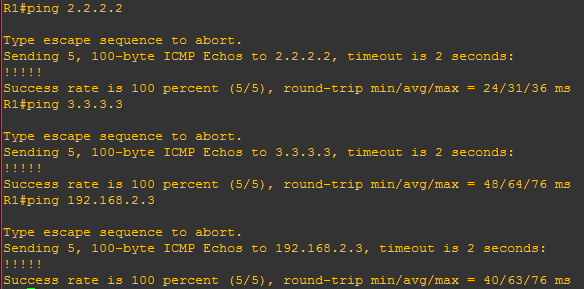
R1# ping 2.2.2.2
R1# ping 3.3.3.3