
How to Build a Juniper EVPN-VXLAN Fabric: Underlay Network Design & Anycast Gateway (Part 1)
 Suresh Thapa
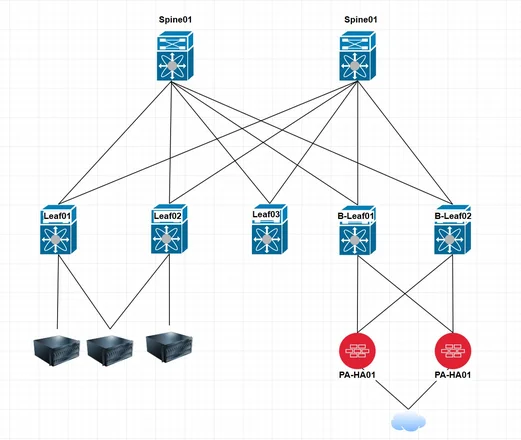
The spine and leaf network architecture is a popular design used in data center networks to provide high-performance, scalable, and resilient connectivity. In this design, spine switches act as the core layer and provide connectivity to leaf switches, which are connected to servers and other devices. Here's an overview of the spine and leaf design:
- Spine switches:
- Spine switches form the core layer of the network and provide connectivity between leaf switches.
- They typically have a higher port density and higher switching capacity.
- Spine switches are designed to handle the high volume of east-west traffic within the data center.
- Leaf switches:
- Leaf switches connect to servers and other devices within the data center.
- They provide access ports for connecting end devices and servers.
- Leaf switches are typically deployed at the top-of-rack (ToR) level, which reduces the cabling complexity and improves scalability.
- Each leaf switch is connected to multiple spine switches for redundancy and load balancing purposes.
- Network connectivity:
- Spine switches are interconnected with each other using high-speed links, forming a full mesh or partial mesh topology.
- Each leaf switch is connected to multiple spine switches, creating multiple paths for traffic flow.
- The leaf switches provide connectivity to servers or devices within their respective pods or racks.
- Traffic between devices within the same leaf switch remains within the rack (east-west traffic).
- Traffic between devices in different racks or pods flows through the spine switches (north-south traffic).
- Benefits of spine and leaf design:
- Scalability: The design allows for easy scalability by adding more leaf switches as the number of devices or servers increases.
- High performance: The architecture provides high-bandwidth, low-latency connectivity, especially for east-west traffic.
- Resiliency: Redundancy at both the spine and leaf layers ensures fault tolerance and minimizes network downtime.
- Simplified cabling: With the ToR deployment of leaf switches, cabling complexity is reduced, making it easier to manage and maintain.
- Additional considerations:
- Routing protocols: Spine switches typically run a routing protocol (e.g., OSPF, BGP) to exchange routing information with each other.
- VLANs and virtualization: VLANs are often used for network segmentation, and virtualization technologies like VXLAN may be employed for network overlay and abstraction.
- Network services: Consider implementing load balancers, firewalls, and other network services at appropriate points in the network to optimize traffic flow and enhance security.
The spine and leaf design offers a flexible and scalable foundation for modern data center networks, accommodating high-performance workloads, virtualization, and cloud environments. However, the specific implementation details and configuration may vary based on the equipment and network requirements in your environment.
A Practical Guide Using Real-World Configurations
Modern data centers rely on scalable, resilient Layer-2 extension across multiple racks. Technologies like EVPN-VXLAN allow you to stretch VLANs across a routed underlay, bringing stability, multi-tenancy, and horizontal scaling.
In this blog, we break down how to build an EVPN-VXLAN fabric using Juniper vQFX Spines, complete with:
- Layer-3 underlay using eBGP
- Overlay EVPN signaling using eBGP
- Loopback-based VTEP addressing
- Anycast Gateway for host mobility
- Equal-cost multipathing (ECMP)
Network Diagram
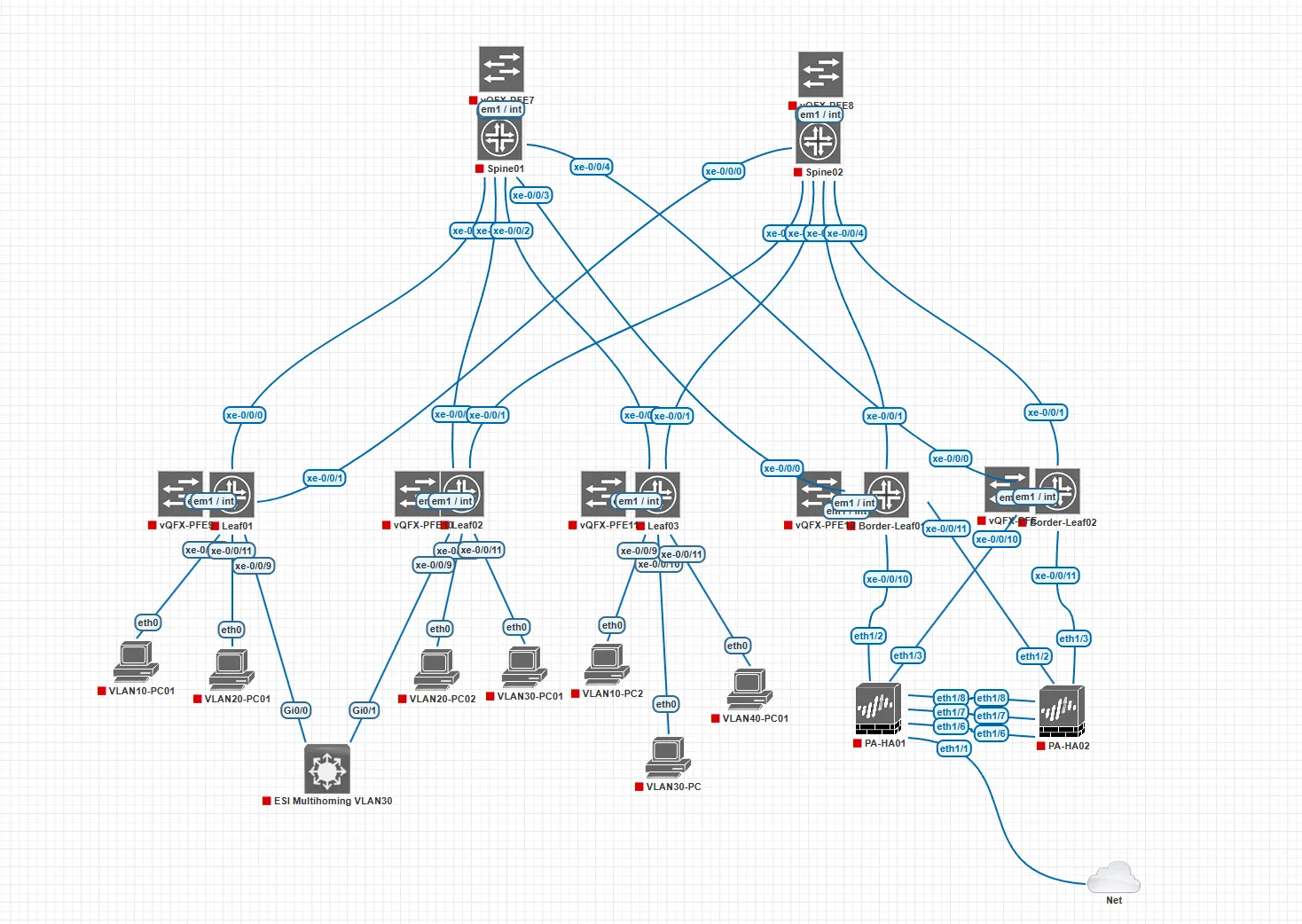
We’ll use the real configurations from Spine 1 and Spine 2 provided by the user.
1. Underlay: Routed IP Fabric with eBGP
The underlay forms the physical foundation on which VXLAN tunnels run.
Each spine uses point-to-point /31 links to connect to leaf switches.
Each spine also has a loopback interface used as:
- Physical Interfaces with Jumbo MTU
- VTEP Source IP (Loopback Interface)
- Router-ID
- BGP overlay source address
Spine-01 Underlay Interfaces
set interfaces xe-0/0/0 mtu 9216
set interfaces xe-0/0/0 unit 0 family inet address 10.1.1.0/31
set interfaces xe-0/0/1 mtu 9216
set interfaces xe-0/0/1 unit 0 family inet address 10.1.1.2/31
set interfaces xe-0/0/2 mtu 9216
set interfaces xe-0/0/2 unit 0 family inet address 10.1.1.4/31
set interfaces xe-0/0/3 mtu 9216
set interfaces xe-0/0/3 unit 0 family inet address 10.1.1.6/31
set interfaces xe-0/0/4 mtu 9216
set interfaces xe-0/0/4 unit 0 family inet address 10.1.1.8/31
Spine-02 Underlay Interfaces
set interfaces xe-0/0/0 mtu 9216
set interfaces xe-0/0/0 unit 0 family inet address 10.1.2.0/31
set interfaces xe-0/0/1 mtu 9216
set interfaces xe-0/0/1 unit 0 family inet address 10.1.2.2/31
set interfaces xe-0/0/2 mtu 9216
set interfaces xe-0/0/2 unit 0 family inet address 10.1.2.4/31
set interfaces xe-0/0/3 mtu 9216
set interfaces xe-0/0/3 unit 0 family inet address 10.1.2.6/31
set interfaces xe-0/0/4 mtu 9216
set interfaces xe-0/0/4 unit 0 family inet address 10.1.2.8/31
set interfaces lo0 unit 0 family inet address 10.0.0.2/32
Leaf-01 Underlay Interfaces
set interfaces xe-0/0/0 mtu 9216
set interfaces xe-0/0/0 unit 0 family inet address 10.1.1.1/31
set interfaces xe-0/0/1 mtu 9216
set interfaces xe-0/0/1 unit 0 family inet address 10.1.2.1/31
set interfaces lo0 unit 0 family inet address 10.0.0.11/32
Leaf-02 Underlay Interfaces
set interfaces xe-0/0/0 mtu 9216
set interfaces xe-0/0/0 unit 0 family inet address 10.1.1.3/31
set interfaces xe-0/0/1 mtu 9216
set interfaces xe-0/0/1 unit 0 family inet address 10.1.2.3/31
set interfaces lo0 unit 0 family inet address 10.0.0.12/32
Leaf-03 Underlay Interfaces
set interfaces xe-0/0/0 mtu 9216
set interfaces xe-0/0/0 unit 0 family inet address 10.1.1.5/31

set interfaces xe-0/0/1 mtu 9216
set interfaces xe-0/0/1 unit 0 family inet address 10.1.2.5/31
set interfaces lo0 unit 0 family inet address 10.0.0.13/32
Border-Leaf-01 Underlay Interfaces
set interfaces xe-0/0/0 mtu 9216
set interfaces xe-0/0/0 unit 0 family inet address 10.1.1.7/31

set interfaces xe-0/0/1 mtu 9216
set interfaces xe-0/0/1 unit 0 family inet address 10.1.2.7/31
set interfaces lo0 unit 0 family inet address 10.0.0.14/32
Border-Leaf-02 Underlay Interfaces
set interfaces xe-0/0/0 mtu 9216
set interfaces xe-0/0/0 unit 0 family inet address 10.1.1.9/31

set interfaces xe-0/0/1 mtu 9216
set interfaces xe-0/0/1 unit 0 family inet address 10.1.2.9/31
set interfaces lo0 unit 0 family inet address 10.0.0.15/32
2. BGP Underlay (eBGP Per Leaf)
Both spines run eBGP sessions toward each leaf, using different AS numbers for each leaf device.
PL-LB → ECMP Load Balancing
Why needed?
Because each leaf has two equal-cost routes to every other leaf’s loopback:
Without this policy Junos may do:
- per-flow load balancing
- or choose only 1 spine (based on hash)
But in a VXLAN fabric, you want:
Maximum bandwidth utilization
- Traffic to remote VTEPs spreads across both spines.
Fast failover
- If Spine1 dies → traffic instantly shifts to Spine2.
Better redundancy
- Fully uses your fabric capacity.
- So this policy forces per-packet ECMP, which is common in VXLAN fabrics.
Create this policy on all the switches Ex: Spine1-2, Leaf1-3 and border-Leaf01-2
set policy-options policy-statement PL-LB then load-balance per-packet
set routing-options forwarding-table export PL-LB
EXPORT-LO0 → Advertise Loopback /32 Into Underlay BGP
Purpose:
To allow your loopback address (VTEP IP) to be advertised in BGP
– ONLY the /32 loopback
– Not other /32 interfaces
– Not other "directly-connected” routes
Why needed?
Because:
- VTEP address = loopback address
- VTEP must be reachable across the underlay
- BGP does NOT advertise "direct" routes by default
- Junos requires an explicit export policy
- You do NOT want to leak all connected interfaces — only the loopback
So this filter:
Matches only the exact loopback route
10.1.255.12/32 (for Leaf2)
Prevents other interfaces from leaking into BGP
(very important in large fabrics)
Ensures VTEP reachability across the entire fabric
(critical for VXLAN tunnels)
set policy-options policy-statement EXPORT-LO0 from protocol direct
set policy-options policy-statement EXPORT-LO0 from route-filter 10.0.0.15/32 exact
set policy-options policy-statement EXPORT-LO0 then accept
Spine-1 Underlay BGP Peers
router-id → BGP & EVPN Identification
Purpose of Router-ID:
The router-id uniquely identifies the leaf in:
- BGP sessions (underlay + overlay)
- EVPN control plane
- Route reflectors (if used later)
- Loop detection in BGP
- RIB and BGP table entries
set system host-name Spine01
set routing-options router-id 10.0.0.1
autonomous-system (ASN) → Critical for eBGP Underlay + EVPN
Purpose:
Defines the AS number for the leaf switch.
Why each leaf has a different ASN?
Because you are using eBGP-based IP fabric, where:
- Every leaf has its own ASN
- Every spine has its own ASN
- No two connected routers share the same ASN
set routing-options autonomous-system 65000
Creat EXPORT-LO0 Polict→ Advertise Loopback /32 Into Underlay BGP
set policy-options policy-statement EXPORT-LO0 from protocol direct
set policy-options policy-statement EXPORT-LO0 from route-filter 10.0.0.1/32 exact
set policy-options policy-statement EXPORT-LO0 then accept
set protocols bgp group LEAF-UNDERLAY type external
set protocols bgp group LEAF-UNDERLAY export EXPORT-LO0
set protocols bgp group LEAF-UNDERLAY multipath multiple-as
set protocols bgp group LEAF-UNDERLAY neighbor 10.1.1.1 peer-as 65101
set protocols bgp group LEAF-UNDERLAY neighbor 10.1.1.3 peer-as 65102
set protocols bgp group LEAF-UNDERLAY neighbor 10.1.1.5 peer-as 65103
set protocols bgp group LEAF-UNDERLAY neighbor 10.1.1.7 peer-as 65104
set protocols bgp group LEAF-UNDERLAY neighbor 10.1.1.9 peer-as 65105
Spine-2 Underlay BGP Peers
router-id → BGP & EVPN Identification
set system host-name Spine02
set routing-options router-id 10.0.0.2
autonomous-system (ASN) → Critical for eBGP Underlay + EVPN
set routing-options autonomous-system 65000
Creat EXPORT-LO0 Polict→ Advertise Loopback /32 Into Underlay BGP
set policy-options policy-statement EXPORT-LO0 from protocol direct
set policy-options policy-statement EXPORT-LO0 from route-filter 10.0.0.2/32 exact
set policy-options policy-statement EXPORT-LO0 then accept
set protocols bgp group LEAF-UNDERLAY type external
set protocols bgp group LEAF-UNDERLAY export EXPORT-LO0
set protocols bgp group LEAF-UNDERLAY multipath multiple-as
set protocols bgp group LEAF-UNDERLAY neighbor 10.1.2.1 peer-as 65101
set protocols bgp group LEAF-UNDERLAY neighbor 10.1.2.3 peer-as 65102
set protocols bgp group LEAF-UNDERLAY neighbor 10.1.2.5 peer-as 65103
set protocols bgp group LEAF-UNDERLAY neighbor 10.1.2.7 peer-as 65104
set protocols bgp group LEAF-UNDERLAY neighbor 10.1.2.9 peer-as 65105
Leaf-01 Underlay BGP Peers
router-id → BGP & EVPN Identification
set system host-name Leaf01
set routing-options router-id 10.0.0.11
autonomous-system (ASN) → Critical for eBGP Underlay + EVPN
set routing-options autonomous-system 65101
Creat EXPORT-LO0 Polict→ Advertise Loopback /32 Into Underlay BGP
set policy-options policy-statement EXPORT-LO0 from protocol direct
set policy-options policy-statement EXPORT-LO0 from route-filter 10.0.0.11/32 exact
set policy-options policy-statement EXPORT-LO0 then accept
set protocols bgp group SPINE-UNDERLAY type external
set protocols bgp group SPINE-UNDERLAY export EXPORT-LO0
set protocols bgp group SPINE-UNDERLAY multipath
set protocols bgp group SPINE-UNDERLAY neighbor 10.1.1.0 peer-as 65000
set protocols bgp group SPINE-UNDERLAY neighbor 10.1.2.0 peer-as 65000
Leaf-2 Underlay BGP Peers
router-id → BGP & EVPN Identification
set system host-name Leaf02
set routing-options router-id 10.0.0.12
autonomous-system (ASN) → Critical for eBGP Underlay + EVPN
set routing-options autonomous-system 65102
Creat EXPORT-LO0 Polict→ Advertise Loopback /32 Into Underlay BGP
set policy-options policy-statement EXPORT-LO0 from protocol direct
set policy-options policy-statement EXPORT-LO0 from route-filter 10.0.0.12/32 exact
set policy-options policy-statement EXPORT-LO0 then accept
set protocols bgp group SPINE-UNDERLAY type external
set protocols bgp group SPINE-UNDERLAY export EXPORT-LO0
set protocols bgp group SPINE-UNDERLAY multipath
set protocols bgp group SPINE-UNDERLAY neighbor 10.1.1.2 peer-as 65000
set protocols bgp group SPINE-UNDERLAY neighbor 10.1.2.2 peer-as 65000
Leaf-3 Underlay BGP Peers
router-id → BGP & EVPN Identification
set system host-name Leaf03
set routing-options router-id 10.0.0.13
autonomous-system (ASN) → Critical for eBGP Underlay + EVPN
set routing-options autonomous-system 65103
Creat EXPORT-LO0 Polict→ Advertise Loopback /32 Into Underlay BGP
set policy-options policy-statement EXPORT-LO0 from protocol direct
set policy-options policy-statement EXPORT-LO0 from route-filter 10.0.0.13/32 exact
set policy-options policy-statement EXPORT-LO0 then accept
set protocols bgp group SPINE-UNDERLAY type external
set protocols bgp group SPINE-UNDERLAY export EXPORT-LO0
set protocols bgp group SPINE-UNDERLAY multipath
set protocols bgp group SPINE-UNDERLAY neighbor 10.1.1.4 peer-as 65000
set protocols bgp group SPINE-UNDERLAY neighbor 10.1.2.4 peer-as 65000
Border-Leaf01 Underlay BGP Peers
router-id → BGP & EVPN Identification
set system host-name BDR-Leaf01
set routing-options router-id 10.0.0.14
autonomous-system (ASN) → Critical for eBGP Underlay + EVPN
set routing-options autonomous-system 65104
Creat EXPORT-LO0 Polict→ Advertise Loopback /32 Into Underlay BGP
set policy-options policy-statement send-direct term 1 from set policy-options policy-statement EXPORT-LO0 from protocol direct
set policy-options policy-statement EXPORT-LO0 from route-filter 10.0.0.14/32 exact
set policy-options policy-statement EXPORT-LO0 then accept
set protocols bgp group SPINE-UNDERLAY type external
set protocols bgp group SPINE-UNDERLAY export EXPORT-LO0
set protocols bgp group SPINE-UNDERLAY multipath
set protocols bgp group SPINE-UNDERLAY neighbor 10.1.1.6 peer-as 65000
set protocols bgp group SPINE-UNDERLAY neighbor 10.1.2.6 peer-as 65000
Border-Leaf02 Underlay BGP Peers
router-id → BGP & EVPN Identification
set system host-name BDR-Leaf02
set routing-options router-id 10.0.0.15
autonomous-system (ASN) → Critical for eBGP Underlay + EVPN
set routing-options autonomous-system 65105
Creat EXPORT-LO0 Polict→ Advertise Loopback /32 Into Underlay BGP
set policy-options policy-statement EXPORT-LO0 from protocol direct
set policy-options policy-statement EXPORT-LO0 from route-filter 10.0.0.15/32 exact
set policy-options policy-statement EXPORT-LO0 then accept
set protocols bgp group SPINE-UNDERLAY type external
set protocols bgp group SPINE-UNDERLAY export EXPORT-LO0
set protocols bgp group SPINE-UNDERLAY multipath
set protocols bgp group SPINE-UNDERLAY neighbor 10.1.1.8 peer-as 65000
set protocols bgp group SPINE-UNDERLAY neighbor 10.1.2.8 peer-as 65000