
How to Build a Juniper EVPN-VXLAN Fabric: VXLAN & Anycast Gateway (Part 3)
 Suresh Thapa
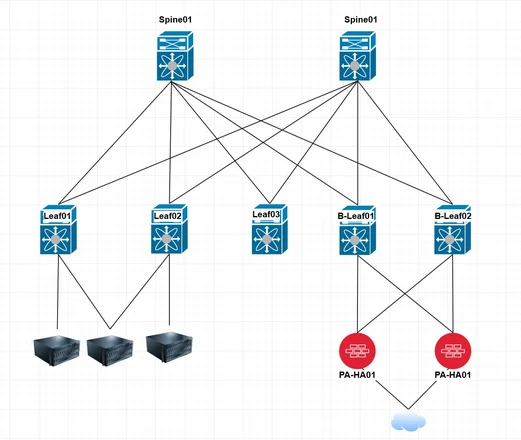
In Part 1, we built the underlay network.
In Part 2, we configured the BGP EVPN overlay (control plane).
Now in Part 3, we bring everything to life by configuring:
VXLAN Data Plane + Anycast Gateway
This is where:
- VXLAN tunnels are formed
- VLANs are mapped to VNIs
- Distributed gateway (IRB) is enabled
- Inter-VLAN routing happens across the fabric
What is VXLAN + Anycast Gateway?
VXLAN
VXLAN encapsulates Layer 2 traffic over Layer 3 using:
- VTEPs (VXLAN Tunnel Endpoints)
- VNIs (VXLAN Network Identifiers)
Anycast Gateway
All leaf switches share the same gateway IP and MAC, allowing:
- Active/Active gateway
- No traffic hairpinning
- Optimal routing
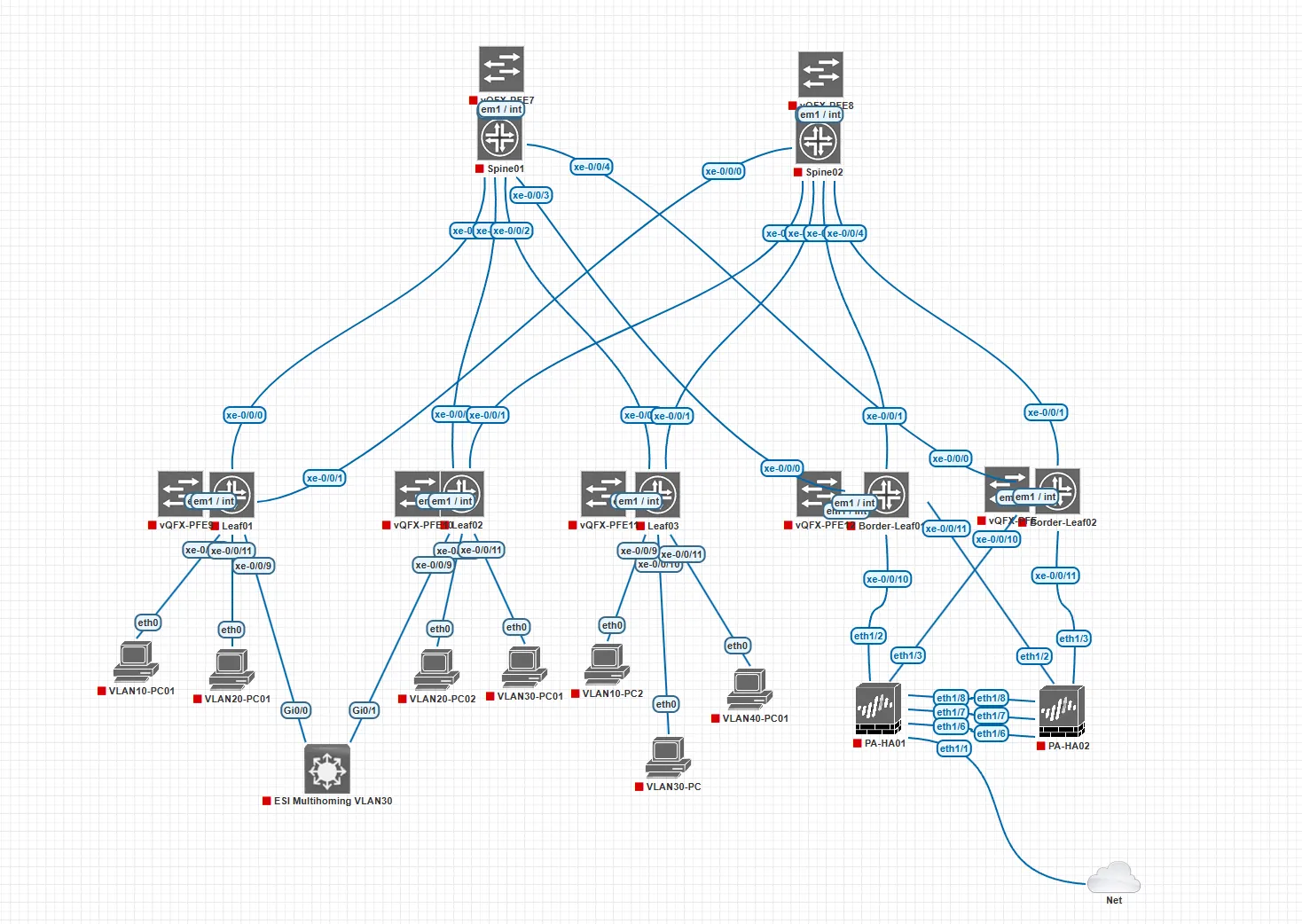
Step 1: Configure VTEP (VXLAN Tunnel Endpoint)
# Same for all the Leaf and Border Leaf switches
set switch-options vtep-source-interface lo0.0
This defines the source IP for VXLAN tunnels (loopback interface).
Step 2: Configure Route Distinguisher & VRF Target
# route-distinguisher (RD) Must be unique per leaf
set switch-options route-distinguisher 10.0.0.11:1
set switch-options vrf-target target:65000:9999
set switch-options vrf-target auto
Explanation:
- route-distinguisher (RD) → Must be unique per leaf
- vrf-target → Used for route import/export
- auto → Automatically derives RT for EVPN
Step 3: Enable EVPN VXLAN Encapsulation
# Same for all the Leaf and Border Leaf switches
set protocols evpn encapsulation vxlan
set protocols evpn extended-vni-list all
set protocols evpn multicast-mode ingress-replication
set protocols evpn default-gateway no-gateway-community
Key Points:
- encapsulation vxlan → Enables VXLAN
- extended-vni-list all → Advertise all VNIs
- ingress-replication → No multicast required
- no-gateway-community → Ensures proper Anycast GW behavior
Step 4: Configure VNI to VRF Mapping
# Same for all the Leaf and Border Leaf switches
set protocols evpn vni-options vni 10010 vrf-target target:65000:10010
set protocols evpn vni-options vni 10020 vrf-target target:65000:10020
This ensures correct route import/export per VNI.
Step 5: Configure VLAN to VNI Mapping
# Same for all the Leaf and Border Leaf switches
set vlans C1-VLAN10 vlan-id 10
set vlans C1-VLAN10 l3-interface irb.10
set vlans C1-VLAN10 vxlan vni 10010

set vlans C2-VLAN20 vlan-id 20
set vlans C2-VLAN20 l3-interface irb.20
set vlans C2-VLAN20 vxlan vni 10020
Each VLAN is mapped to a unique VNI.
Step 6: Configure VRF (Tenant Routing Instance)
# Same for all the Leaf and Border Leaf switches
set routing-instances TENANT-SHARED instance-type vrf
set routing-instances TENANT-SHARED interface irb.10
set routing-instances TENANT-SHARED interface irb.20
Step 7: Configure RD and RT for VRF
# Unique RD per Leaf
set routing-instances TENANT-1 route-distinguisher 10.0.0.11:1010

# Common RT across fabric
set routing-instances TENANT-1 vrf-target target:65000:1010
Design Rule:
- RD → Unique per leaf
- RT → Same across fabric
Step 8: Anycast Gateway (IRB Interfaces)
Although not shown above, you must configure:
# Same for all the Leaf and Border Leaf switches
set interfaces irb unit 10 family inet address 192.168.10.1/24
set interfaces irb unit 20 family inet address 192.168.20.1/24
Same IP must be configured on all leaf switches.
Traffic Flow Explained
Same VLAN (L2 Traffic)
- Host → Leaf
- VXLAN encapsulated → Remote Leaf
- Delivered to destination
Inter-VLAN (L3 Traffic)
- Routed locally via IRB
- No need to go to spine
This is the power of Anycast Gateway
Verification Commands
show evpn database
show ethernet-switching table
Expected Outcome
- VXLAN tunnels established
- MAC/IP learned via EVPN
- Inter-VLAN routing working locally
- No flooding in network
Common Mistakes
❌ Missing vtep-source-interface
❌ Wrong VNI mapping across leafs
❌ Different gateway IPs on leafs
❌ Incorrect VRF target
Full Series Recap
- Part 1 → Underlay Network
- Part 2 → BGP EVPN Overlay
- Part 3 → VXLAN + Anycast Gateway
Conclusion
With VXLAN and Anycast Gateway, your fabric becomes:
- Fully distributed
- Scalable
- High-performance
- Multi-tenant ready
You now have a complete EVPN-VXLAN fabric running on Juniper QFX switches.