
Juniper Switch Routed VLAN Interface (RVI) L3 Interface
 Suresh Thapa
Why Should I Use an RVI?
In addition to providing communication between VLANs, an RVI binds specific VLANs to specific Layer 3 interfaces, allowing you to track RVI use for billing purposes. Configure an RVI for a VLAN if you need to:
- Allow traffic to be routed between VLANs.
- Provide Layer 3 IP connectivity to the switch.
Creating an RVI
Configure VLANs—Virtual LANs are groups of hosts that communicate as if they were attached to the same broadcast stream. VLANs are created with software and do not require a physical router to forward traffic. VLANs are Layer 2 constructs.
Create RVIs for the VLANs—The switch’s RVI uses Layer 3 logical interfaces on the switch (unlike routers, which can use either physical or logical interface).
Assign an IP address to each VLAN—An RVI cannot be activated unless it is associated with a physical interface.
Bind the VLANs to the logical interfaces—There is a one-to-one mapping between a VLAN and an RVI, so only one RVI can be mapped to a VLAN.
.png)
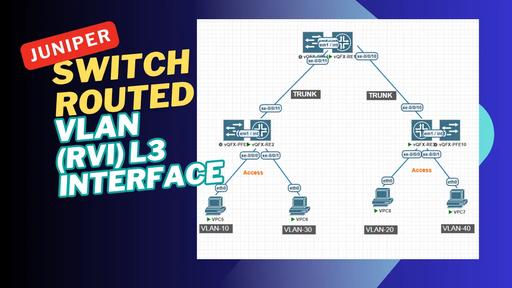
Please configure VLANs, Access and Trunk ports on switches according to diagram
We'll create and assign the following VLANs:
VLAN ID | Name | IP Addresses |
|---|---|---|
| 10 | MANAGEMENT | 10.1.10.0/24 |
| 20 | ADMIN | 10.1.20.0/24 |
| 30 | IT | 10.1.30.0/24 |
| 40 | ACCOUNTS | 10.1.40.0/24 |
Create VLANs 10 and 20 learn Create VLANs.
set vlans MANAGEMENT vlan-id 10
set vlans ADMIN vlan-id 20
set vlans IT vlan-id 30
set vlans ACCOUNTS vlan-id 40
Create a logical layer 3 VLAN interface on SWITCH-1
set interfaces vlan unit 10 family inet address 10.1.10.1/24
set interfaces vlan unit 10 family inet address 10.1.20.1/24
set interfaces vlan unit 10 family inet address 10.1.30.1/24
set interfaces vlan unit 10 family inet address 10.1.40.1/24
Create a logical layer 3 VLAN interface on SWITCH-2 for management perpose.
set interfaces vlan unit 10 family inet address 10.1.10.2/24
Create a logical layer 3 VLAN interface on SWITCH-3 for management perpose.
set interfaces vlan unit 10 family inet address 10.1.10.3/24
Link the layer 2 VLAN to the layer 3 VLAN interface on SWITCH-1:
set vlans MANAGEMENT l3-interface irb.10
set vlans ADMIN l3-interface irb.20
set vlans IT l3-interface irb.30
set vlans ACCOUNTS l3-interface irb.40
Link the layer 2 VLAN to the layer 3 VLAN interface on SWITCH-2 and SWITCH-3:
set vlans MANAGEMENT l3-interface irb.10
Create a default route on SWITCH-2 and SWITCH-3 point to SWITCH-1.
This static route important for SWITCH-2 and SWITCH-3 for inter-vlan communication and traffic for internet.
set routing-options static route 0.0.0.0/0 next-hop 10.1.10.1
Verify L3 ports and their status:
show interface terse
Output on SWITCH-1 in interface list.
irb.10                 up    up   inet     10.1.10.1/24
irb.20                 up    up   inet     10.1.20.1/24
irb.30                 up    up   inet     10.1.30.1/24
irb.40                 up    up   inet     10.1.40.1/24
Output on SWITCH-2 in interface list.
irb.10 up up inet 10.1.10.2/24
Output on SWITCH-3 in interface list.
irb.10 up up inet 10.1.10.3/24