
VTP – VLAN Trunking Protocol on Cisco Switch
 Suresh Thapa
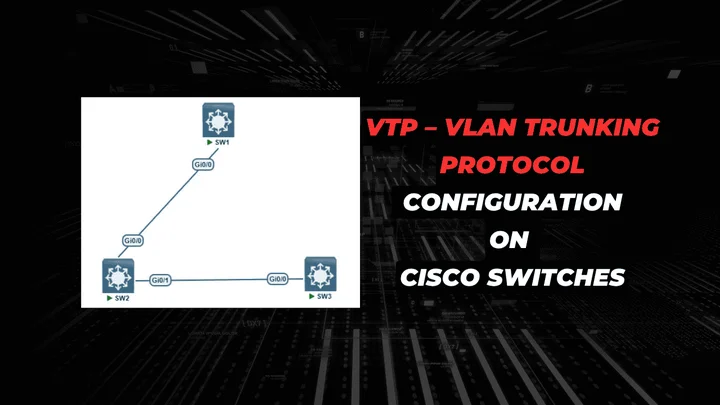
VLAN Trunk Protocol (VTP) reduces administration in a switched network. When you configure a new VLAN on one VTP server, the VLAN is distributed through all switches in the domain. This reduces the need to configure the same VLAN everywhere. VTP is a Cisco-proprietary protocol that is available on most of the Cisco Catalyst series products.
You can configure a switch to operate in any one of these VTP modes:
Server—In VTP server mode, you can create, modify, and delete VLANs and specify other configuration parameters, such as VTP version and VTP pruning, for the entire VTP domain. VTP servers advertise their VLAN configuration to other switches in the same VTP domain and synchronize their VLAN configuration with other switches based on advertisements received over trunk links. VTP server is the default mode.
Client—VTP clients behave the same way as VTP servers, but you cannot create, change, or delete VLANs on a VTP client.
Transparent—VTP transparent switches do not participate in VTP. A VTP transparent switch does not advertise its VLAN configuration and does not synchronize its VLAN configuration based on received advertisements, but transparent switches do forward VTP advertisements that they receive out their trunk ports in VTP Version 2.
For this lab you need EVE-NG and IOSv-L2
Tasks
Create the following VLANS on Switch1
VLAN 10: name Management
VLAN 20: name IT
VLAN 30: name Admin
- Configure the interfaces between the switches as trunks.
- Configure switch Swtich1 to be the VTP server.
- Configure switch Swtich3 to be a VTP client.
- Configure switch2 Transparent
- Change the VTP domain name to “cisco”.
- Use the password “cisco123” for VTP.
VLAN Trunking Protocol Topology
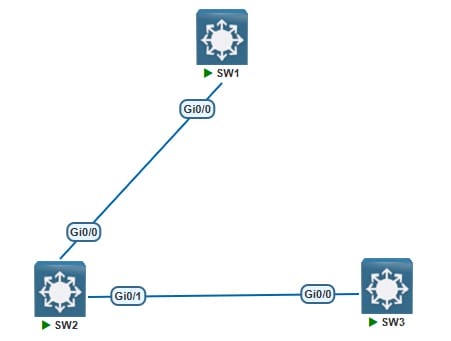
SW1 Configurations
Configure VLANs on SW1
Switch(config)#hostname SW1
SW1(config)#vlan 10
SW1(config-vlan)#name Managment
SW1(config)#vlan 20
SW1(config-vlan)#name IT
SW1(config)#vlan 30
SW1(config-vlan)#name Admin
Configure Trunk Port on SW1
SW1(config)#interface gigabitEthernet 0/0
SW1(config-if)#switchport trunk encapsulation dot1q
SW1(config-if)#switchport mode trunk
SW1(config-if)#no shutdown
Configuration of VTP on SW1
SW1(config)#vtp version 2
SW1(config)#vtp mode server
SW1(config)#vtp domain cisco
SW1(config)#vtp password cisco123
SW2 Configurations
Configure VLANs on SW2
SW2(config)#vlan 10
SW2(config-vlan)#name Managment
SW2(config)#vlan 20
SW2(config-vlan)#name IT
SW2(config)#vlan 30
SW2(config-vlan)#name Admin
Configure Trunk Port on SW2
SW2(config)#interface gigabitEthernet 0/0
SW2(config-if)#switchport trunk encapsulation dot1q
SW2(config-if)#switchport mode trunk
SW2(config-if)#no shutdown
SW2(config)#interface gigabitEthernet 0/1
SW2(config-if)#switchport trunk encapsulation dot1q
SW2(config-if)#switchport mode trunk
SW2(config-if)#no shutdown
Configuration SW2 as VTP Transport mode.
SW2(config)#vtp version 2
SW2(config)#vtp mode transparent
SW2(config)#vtp domain cisco
SW2(config)#vtp password cisco123
Switch3 Configurations
Don’t configure VLANs on Switch3 vlans should replicate automatically.
Configure Trunk Port on SW3
SW3(config)#interface gigabitEthernet 0/0
SW3(config-if)#switchport trunk encapsulation dot1q
SW3(config-if)#switchport mode trunk
SW3(config-if)#no shutdown
Configuration SW3 as VTP client.
SW3(config)#vtp version 2
SW3(config)#vtp mode client
SW3(config)#vtp domain cisco
SW3(config)#vtp password cisco123
Check vlans on Switch3 all the vlans should be there.
show vlans